
 by Marcel Nanning |
Last Updated: November 19, 2026
I have spent six months using Zoho CRM as the primary tool for managing leads, tracking deals, and automating follow-ups for a small services business. The platform promises a great deal, affordable pricing, deep customisation, AI-powered assistance, and an ecosystem of connected apps. After half a year of daily use, I can tell you which promises hold up and which ones require a closer look before you sign up.
According to Fortune Business Insights, the global CRM market was valued at $112.91 billion in 2025 and is forecast to reach $320.99 billion by 2034. With that much money flowing into the category, you would expect every platform to have earned its place. Zoho CRM has, but with caveats that matter enormously depending on who you are and how much technical patience you bring to the table.
Key takeaways
- Pricing is genuinely competitive: Capterra’s Zoho CRM pricing page confirms that paid plans range from $14 to $52 per user per month, with a free plan for up to three users, making it one of the most affordable full-featured CRM options on the market. If you are comparing on cost alone, budget at the Standard tier and upgrade only when you hit a genuine workflow wall.
- Setup effort is real: Zoho ships as a toolkit, not a finished workflow, and its value depends almost entirely on setup, if you want a CRM that works well out of the box with zero admin effort, Zoho will frustrate you, as Layer3Labs’ honest review makes clear.
- AI features require the Enterprise tier: The full Zia AI assistant, including predictions, recommendations, forecasting, and anomaly detection, lives behind the Enterprise plan, making it the first tier that includes everything teams want from AI.
- Support inconsistency is a documented risk: The most common knock on Zoho is support, with users reporting slow and variable response times, particularly on lower tiers, and Zoho’s quality-of-support score sits around 7 out of 10, behind specialist competitors. Budget for the premium support add-on if uptime matters.
- The ecosystem rewards commitment: The more of the Zoho suite you use alongside the CRM, Books, Desk, Campaigns, Analytics, the more the investment pays off.
Who should choose Zoho CRM
| Use case | Best plan | Effort level | Time to value |
|---|---|---|---|
| Solo founder or very small team | Free or Standard ($14) | Low | Days |
| Growing sales team needing automation | Professional ($23) | Medium | 2-4 weeks |
| Team wanting AI lead scoring and forecasting | Enterprise ($40) | High | 4-8 weeks |
| Organisation running the full Zoho suite | Ultimate ($52) or CRM Plus | High | 6-12 weeks |
| Large enterprise with complex reporting | Zoho Analytics add-on required | Very high | Months |
Start here if you are:
A budget-conscious small team: The Standard plan at $14 per user per month gives you scoring rules, email insights, and the Canvas page builder, enough to run a clean sales process without overspending.
Already in the Zoho ecosystem: If you use Zoho Books or Zoho Desk, the CRM integrations are native and instant. The return on investment compounds quickly.
A technically minded operator: The deeper you are willing to go into workflow rules, Blueprints, and custom functions, the more Zoho repays your time.
Pricing: more flexible than it first appears
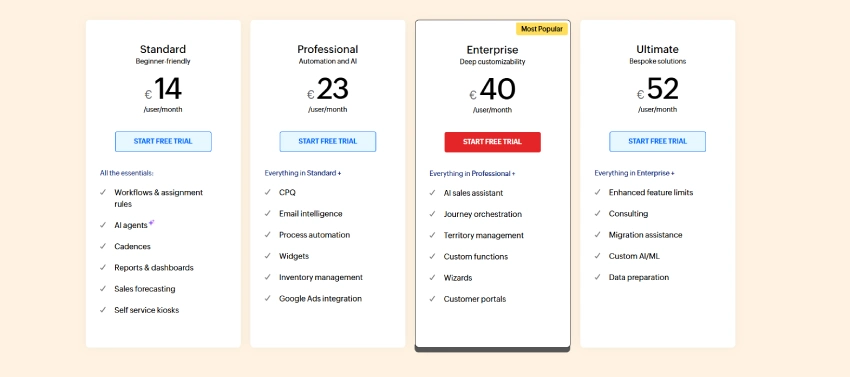
Zoho CRM offers five tiers: a Free plan for up to three users with basic CRM functionality, Standard at $14 per user per month, Professional at $23, Enterprise at $40, and Ultimate at $52, all prices based on annual billing, as Siit’s 2025 Zoho review outlines.
The free plan is genuinely useful
While most “free” CRM solutions offer little more than contact storage, Zeeg’s complete pricing guide notes that Zoho’s free plan includes lead management, basic automation, and reporting capabilities. For a freelancer or a micro-business testing CRM for the first time, this is a meaningful starting point. That said, the three-user cap becomes a ceiling very quickly.
The Standard plan is where most small businesses land
In my experience, the Standard plan at $14 is where the platform starts to feel like a proper CRM rather than a demonstration. You gain scoring rules, email insights, and the Canvas drag-and-drop interface builder, which lets you redesign record pages without touching any code. The vast majority of small businesses with clean, linear sales processes will not need to go beyond this tier.
Professional and above unlock the real automation depth
The Professional plan at $23 per user per month adds Blueprint process enforcement, inventory management, SalesSignals, and macros, as Zoho’s official feature list summarises. Blueprint is the standout feature here; it enforces step-by-step sales processes so your team cannot skip stages or close deals without completing required fields. For any sales team larger than three people, this feature alone justifies the upgrade.
Core features: what actually worked after six months
Lead and pipeline management
This is where Zoho CRM shines without reservation. Zoho CRM aggregates emails, calls, live chat, social media messages, and form submissions into a single customer timeline, so reps can see the full context of every customer interaction across every channel without switching apps, as Zoho’s official feature list describes. After six months, I found the pipeline view reliable and fast. Drag-and-drop deal management works smoothly, and the customisable stages mean the pipeline reflects how I actually sell rather than how some product manager imagined I might.
Workflow automation: powerful but patient
The main strengths of Zoho CRM are strong value for money, deep no-code customisation, powerful workflow automation, and tight integration with 55+ other Zoho apps. I would agree with that assessment, with one important addition: the word “powerful” here means powerful once configured, not powerful on day one.
Building multiple workflow rules, assignment rules, Blueprint processes, and custom Deluge functions is not a one-day project, and probably most sales teams using Zoho CRM run it as a glorified contact database and never touch the automation engine. Do not let that put you off. It is an honest statement about what it takes to get real value from the platform, and the payoff is genuine once you invest the time.
Integrations: deep within the Zoho ecosystem, variable outside it
Zoho CRM provides over 500 native integrations including Google Workspace, Slack, and Microsoft 365. However, my experience with non-Zoho integrations was more mixed. Connections to Google Calendar and Gmail worked reliably. A third-party telephony integration required a workaround before it behaved as expected.

Zia AI: promising, but gated behind the Enterprise tier
In Zoho CRM, Zia predicts lead conversion and deal closure, detects anomalies in sales trends, analyses email sentiment, recommends the best time and channel to contact each person, enriches records from public sources, and suggests workflow automations based on your team’s repeated actions.
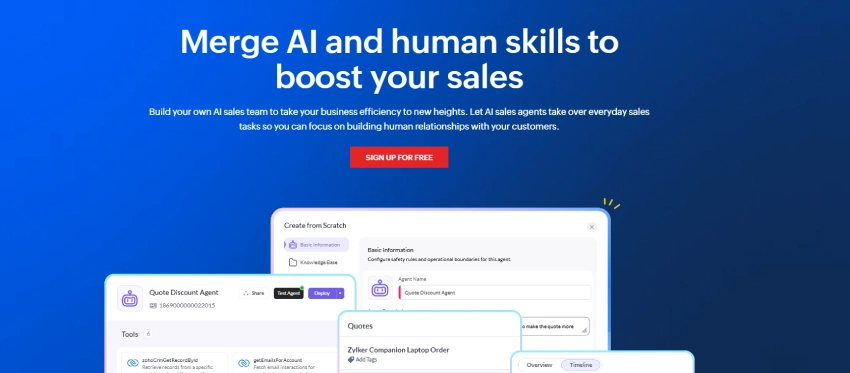
In February 2025, Zoho released a preview of Zia AI agents in Zoho CRM and introduced the Zia Agent Marketplace, where users can select, modify, and use autonomous agents within the CRM system, according to Wikipedia’s Zoho CRM entry).
I tested Zia on the Enterprise plan during the final two months of my review period. The lead scoring feature was the most immediately useful; it surfaced contacts that had been sitting cold in the pipeline and flagged them before they went entirely dark. Email sentiment analysis was useful in theory but required a reasonable volume of historical email data before the predictions became reliable. For a small team just starting out, the AI feels like a future upgrade rather than a day-one necessity.
To activate Zia in Zoho CRM, you must have an Enterprise or Ultimate plan. If you are on Standard or Professional, Zia simply does not appear. This is a meaningful consideration for teams shopping on a tight budget who are attracted by Zoho’s AI marketing.
What frustrated me: the honest list
After six months, these are the friction points I would want anyone evaluating Zoho CRM to understand clearly.
Support quality is inconsistent
Zoho CRM’s support can be a mixed bag, while Zoho offers phone, email, and live chat channels for flexibility, the quality of support received can be wildly inconsistent depending on the agent you reach, as the hands-on review by Venture Harbour and other independent reviewers confirm. My own experience with standard support matched this pattern exactly. Routine questions were answered promptly. Anything requiring deeper technical knowledge took days and rarely resulted in a satisfying resolution.
Classic support, included in all paid plans, is limited to 8×5 email, and faster response times require paid Premium or Enterprise support add-ons. Factor this into your total cost calculation before committing.
The interface can feel cluttered
The user interface feels cluttered and outdated in places, demanding more clicks for tasks compared to modern competitors, and it can lag during peak hours or when handling large datasets. This is particularly noticeable when navigating between modules. The Canvas design tool mitigates this problem significantly on record pages, but the broader navigation remains a little overwhelming for first-time CRM users.
Cross-app design inconsistency
CRM, Campaigns, Desk, and Analytics are separate apps with separate settings and slightly different design languages, so cross-app work sometimes feels like four products taped together rather than one platform. Over six months, I adapted to this, but it added friction in the early weeks.
Pros:
- Competitive pricing across all tiers, with a genuinely functional free plan
- Deep no-code customisation of fields, modules, pipeline stages, and record layouts
- Over 500 native integrations with major business tools
- Omnichannel communication timeline in a single customer record
- Blueprint process enforcement keeps sales teams on track
- Zia AI agents and predictive scoring on Enterprise and Ultimate plans
- Part of a broader 55+ app ecosystem that integrates natively
Cons:
- Steep configuration learning curve, not plug-and-play
- Zia AI is locked behind the Enterprise tier at $40 per user per month
- Support quality is inconsistent, particularly on lower-priced plans
- Interface feels cluttered and navigation requires extra clicks
- Cross-app design language varies noticeably between Zoho products
- Advanced reporting requires Zoho Analytics as a separate layer
- Performance can lag when handling large datasets

Frequently asked questions
Is Zoho CRM good for beginners?
Zoho CRM is manageable for beginners at the basic level, logging contacts, tracking deals, and sending emails. The challenge comes when you try to build automation and customise workflows, where a steeper learning curve applies. Certain areas of the interface can feel inconsistent, and some workflows are not always as intuitive as they could be, and because of the number of features available, there can be a significant learning curve for new users who are not already familiar with CRM systems, as multiple user reviews on independent platforms reflect.
How does Zoho CRM compare on price to alternatives like HubSpot?
Zoho CRM pricing typically runs from $14 to $52 per user per month, while HubSpot’s plans start at $45 monthly and climb into the hundreds for advanced tiers. For feature-equivalent tiers, Zoho is meaningfully cheaper, which matters most for teams with more than five or six users.
Do I need Zoho Analytics to get proper reporting?
Native reporting in Zoho CRM is fine for standard pipeline reporting, but once you need cross-module analysis, you need Zoho Analytics as a separate layer. Zoho Analytics is included with the Ultimate plan but costs extra on lower tiers. Build your reporting requirements into your plan decision before you buy.
Is the Zoho CRM free plan actually usable?
The free plan is built mainly for small teams of up to three users, covering basic contact management, email marketing, lead generation, some basic workflow automation, and standard analytics, as CRM.org’s Zoho review outlines. It is usable for a founder or tiny team testing the platform, but most growing businesses will hit the ceiling within the first few months.
What is the biggest mistake teams make with Zoho CRM?
In my experience, the biggest mistake is treating Zoho CRM like a finished product that works straight out of the box. Zoho is good for teams willing to configure it; it ships as a toolkit, not a finished workflow, and its value depends almost entirely on setup. Teams that invest two to four weeks in proper configuration, pipeline stages, workflow rules, scoring, and email templates, consistently get strong results. Teams that skip setup consistently underuse what they are paying for.
Final verdict
After six months of daily use, Zoho CRM earns a clear recommendation for small to mid-sized businesses that are willing to invest the setup time and are either already in the Zoho ecosystem or planning to be. The pricing is fair, the customisation depth is exceptional for the price, and the pipeline management tools are reliable. The platform from CRMReviews.com‘s perspective sits firmly in the “best value mid-market CRM” bracket.
The caveats are real but manageable. Budget for the premium support add-on if you have low tolerance for slow response times. Plan for a two-to-four-week configuration period before you go live. And if AI lead scoring is a priority from day one, budget for the Enterprise tier at $40 per user per month rather than hoping the lower tiers will cover it.
For a team that enters with open eyes and a willingness to configure, Zoho CRM delivers considerably more value per pound than its price point suggests.
Sources
CRM market size forecast, Fortune Business Insights. Global CRM market data and projections to 2034. Fortune Business Insights